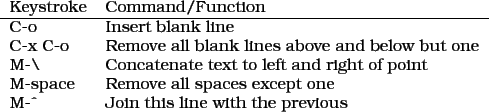
The commands presented here complement the filling techniques described above and provide some additional functionality as well that's useful for writers. C-o is one of the commands I'm most grateful for. It inserts a blank line beneath the cursor and forces all the rest of the text down from the position of the cursor. In other programs you have to hit return and then arrow your way back up to do this. C-M-o does the same, above the cursor.
Just as useful is the opposite: say you've got several blank lines between two paragraphs and you want to clean it up. Rather than manually deleting each line, just hit C-x C-o to remove all blank lines except one.
Two additional commands, M-backslash and M-space clean up space between words, the former removing all spaces and tabs thereby juxtaposing the two words, and the latter removing all spaces but one. Finally, invoke M-x canonically-space-region after selecting some text. It will remove all extraneous spaces so that there's one space between words and two after a period. If you've seriously mashed up your text, this is a quick way to put it back together. Shortcuts like these are the ones that give you the advantage over word processor-users. M-^ will join your current line to the previous.12